
HemWeb CMS
Your own CMS on your own server, ordered online right away. Pick your domain name and your server; the installation is free, with 10, 20 or 50 hours of support if you like. You pay once, then your server sets itself up, and you set up your site with AI’s help.
How you work with HemWeb CMS
The admin of your own site, in English or Dutch: every user picks their own language. Click any text to change it, publish when you are ready.
-
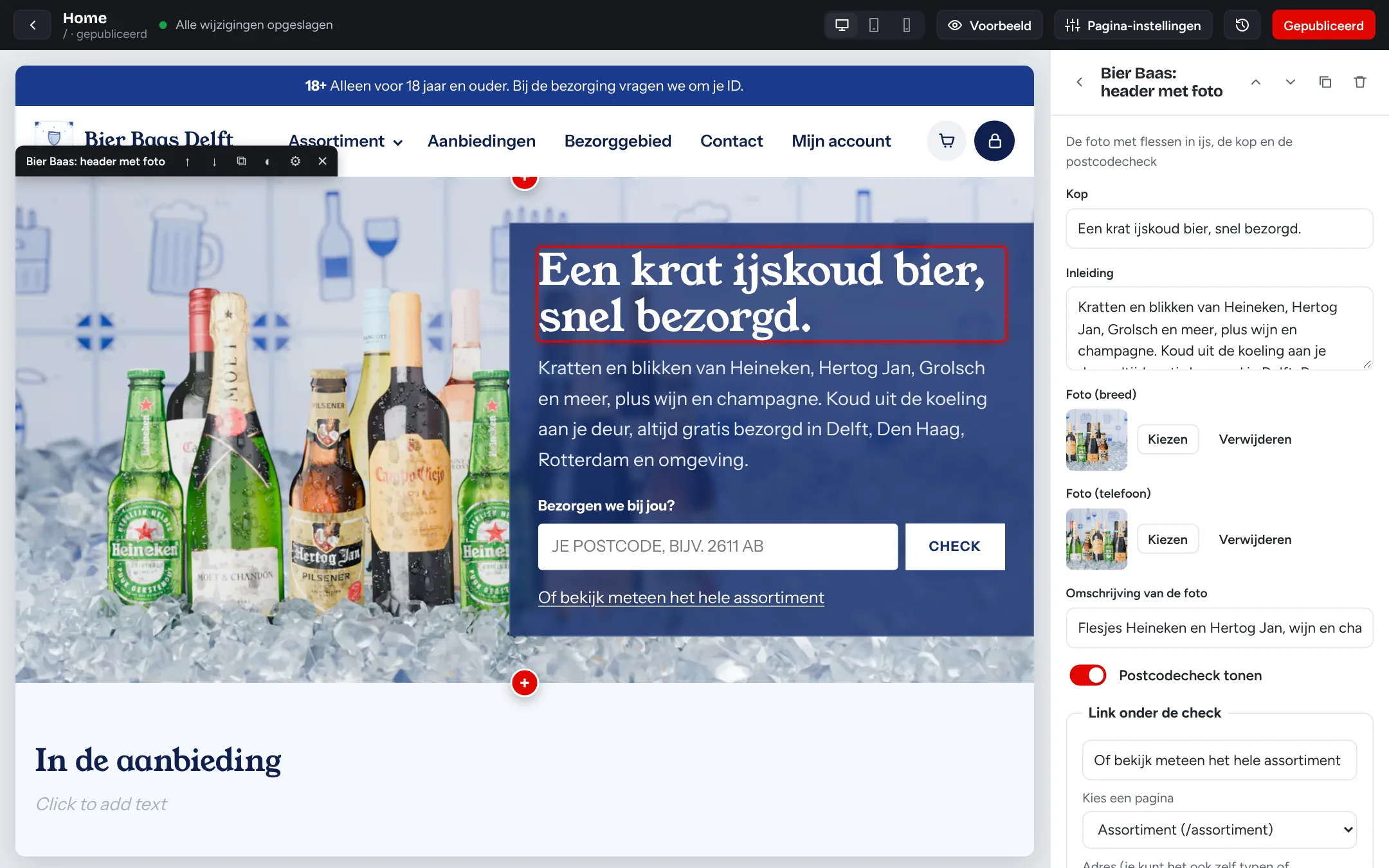
The visual editor
Click a text on your own page and type. What you see is what your visitors see.
- Add, move and copy blocks
- Preview on desktop, tablet and phone
- Draft, publish and version history
-
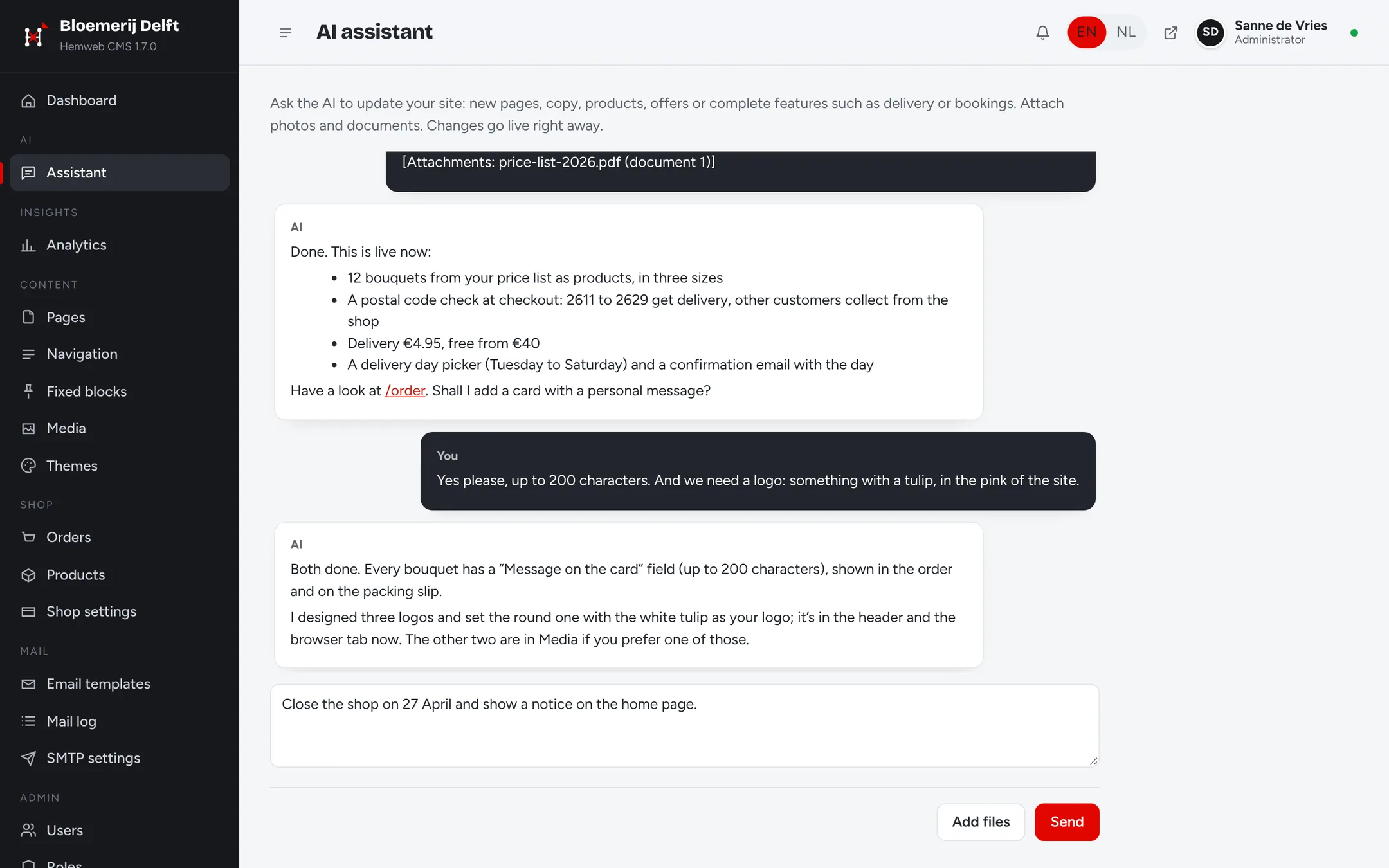
The AI assistant
Ask for a change or a complete feature, and the AI builds it into your own CMS.
- New features as their own module, such as delivery by postal code
- Reads your photos, PDFs and Word and Excel files
- Designs a logo and puts it on your site
-
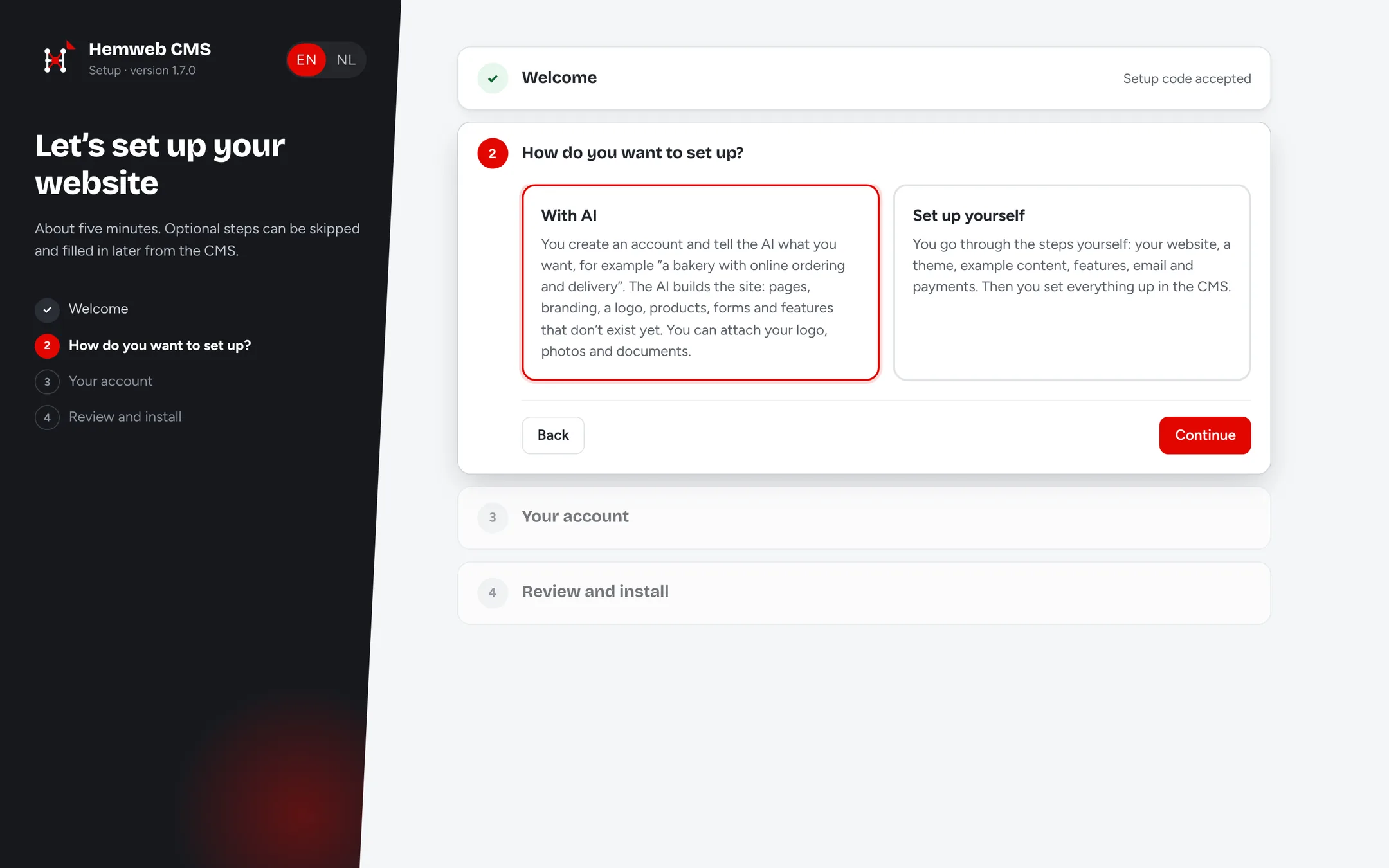
Set up with AI or yourself
Your server installs itself. Then you choose: the AI sets up your site, or you go through the steps yourself.
- Ready in a few minutes
- Your own account, domain and email
- English or Dutch
-
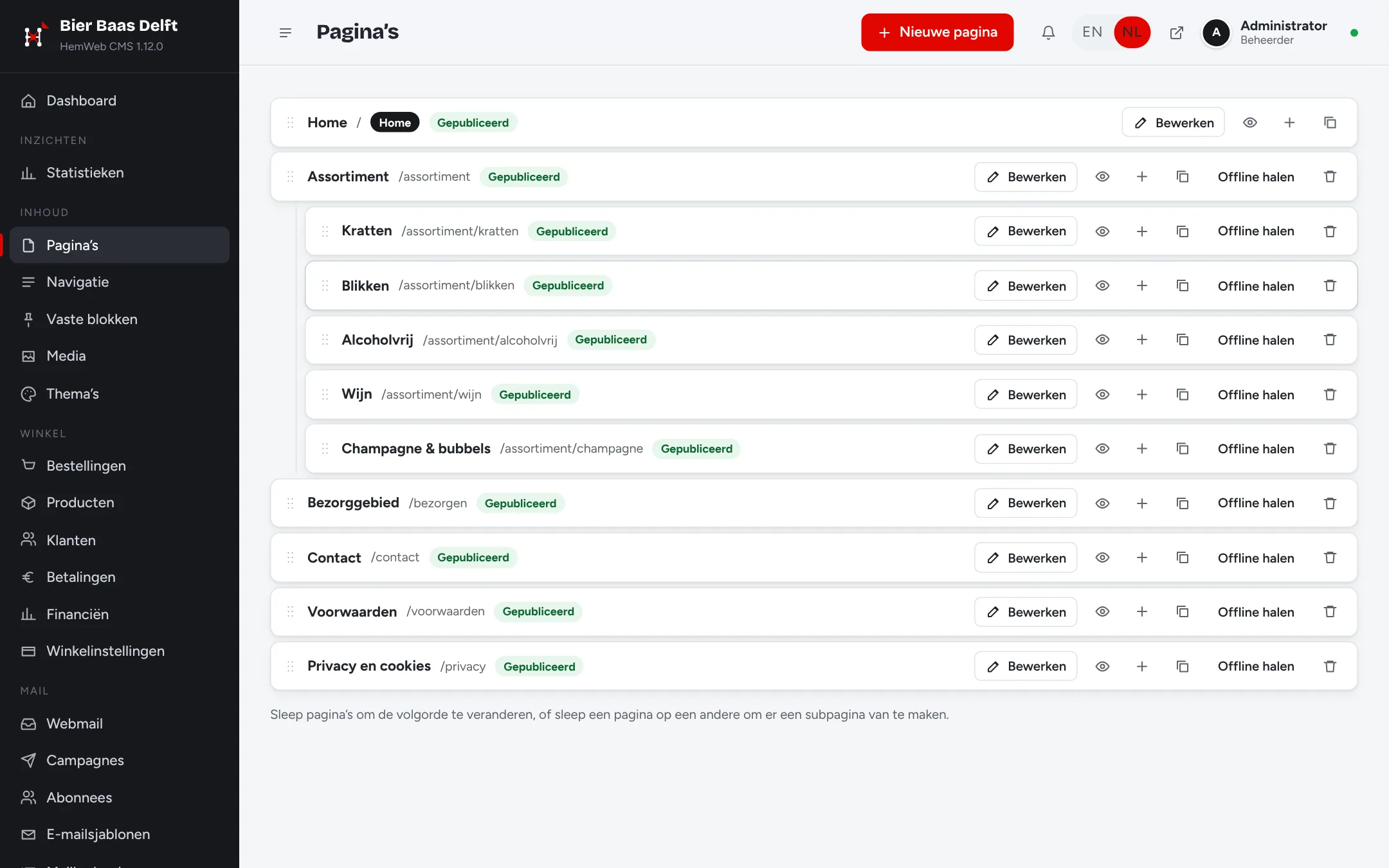
Pages and translations
Order pages and subpages by dragging, and translate them with one click.
- Menus with submenus
- Several languages side by side
- Titles and descriptions for Google
-
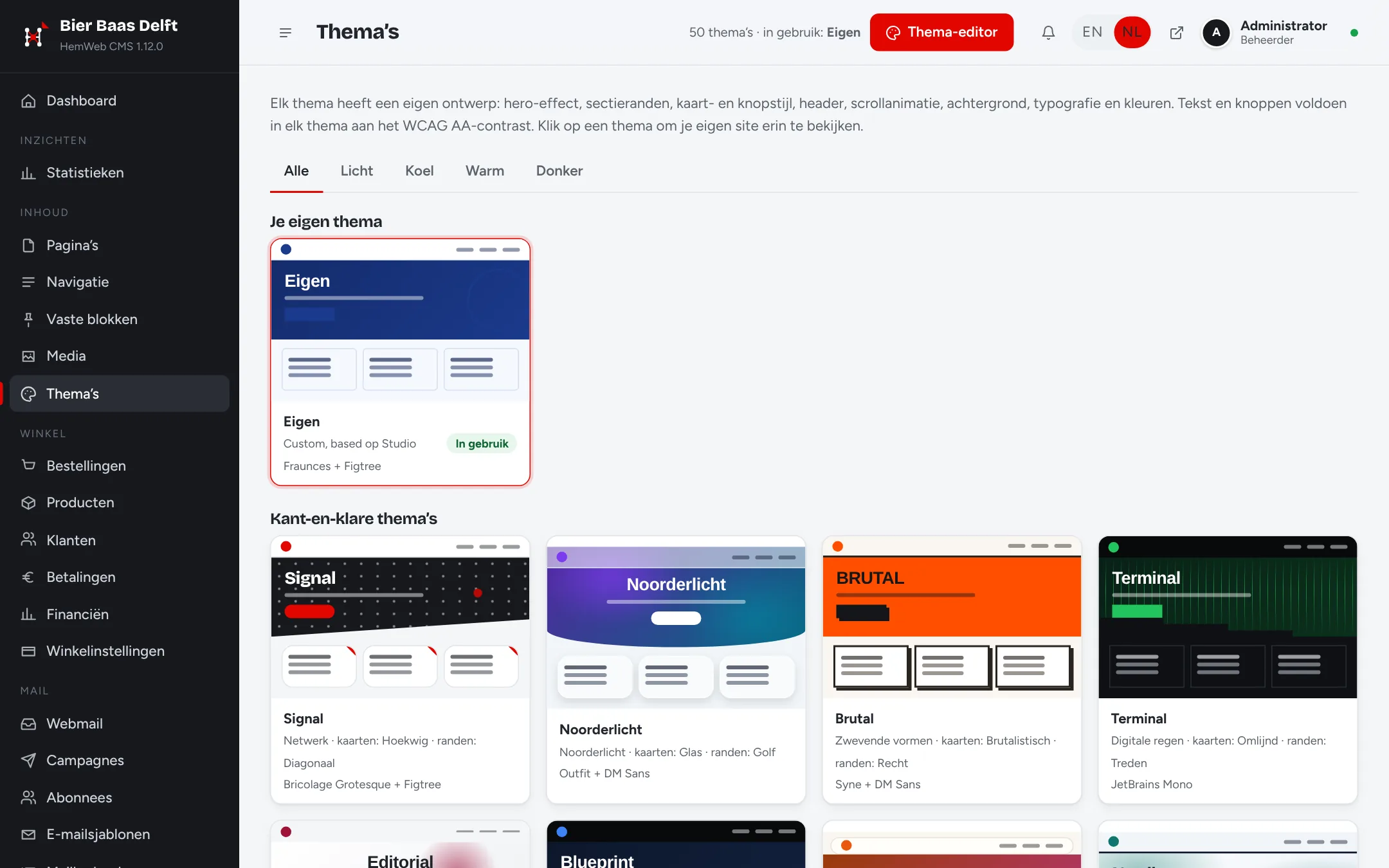
50 themes and a theme editor
Pick a theme and change every colour, font and effect.
- Every theme readable to WCAG AA
- Live preview of your own pages
- Your own logo and CSS
-
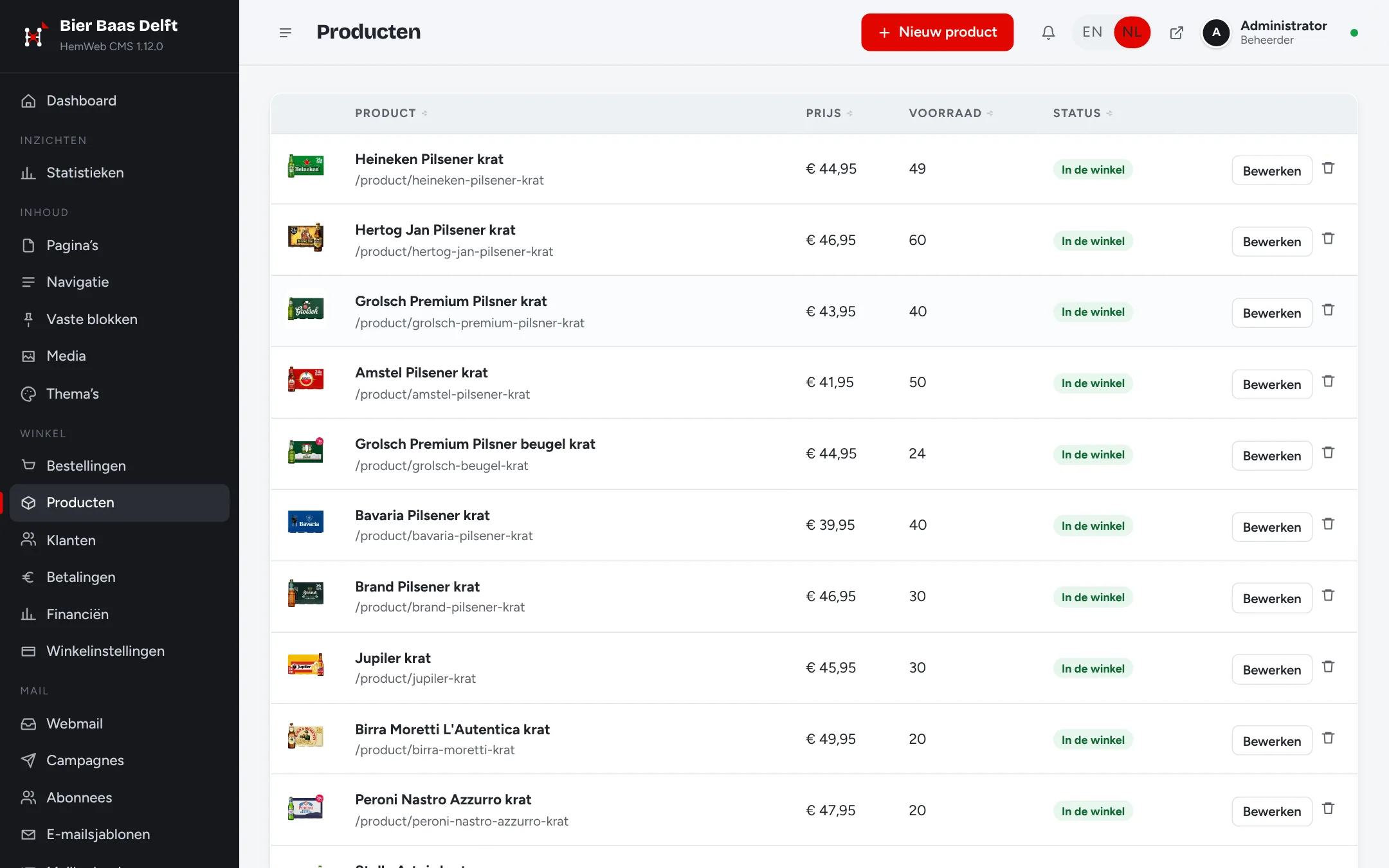
Web shop with payments and shipping
Products, stock and orders, with a five-step checkout, refunds and shipping labels from the CMS.
- iDEAL, card, PayPal, Tikkie, bunq and more: ten ways to pay
- Labels and pick-up points via Sendcloud, MyParcel, PostNL or DHL
- Refunds and a financial overview per payment method
-
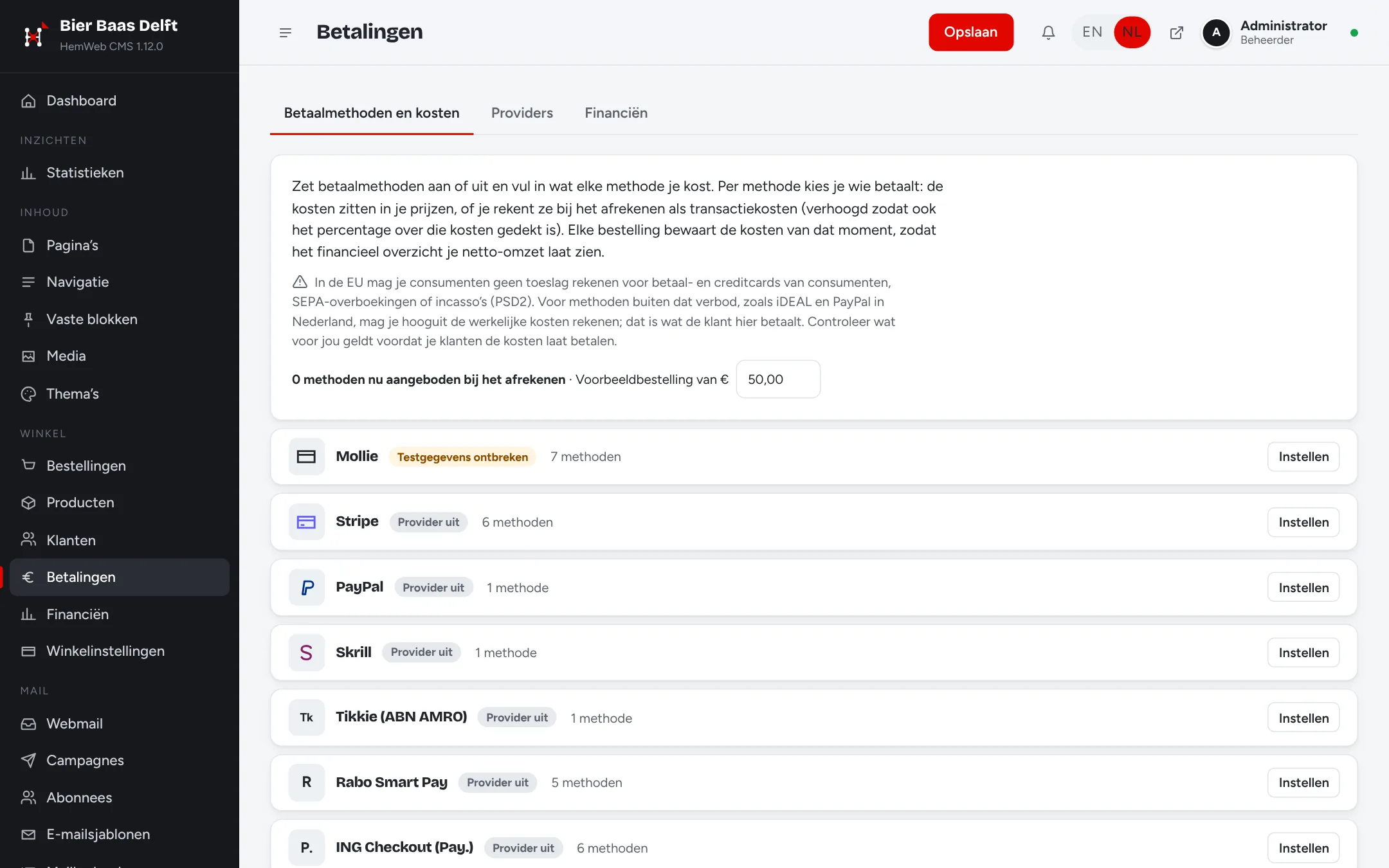
Payments and refunds
Choose your payment providers and methods, and refund an order in one click.
- Mollie, Stripe, PayPal, Tikkie, Skrill, Rabo Smart Pay and ING Checkout
- See the costs per method before you choose
- Refunds with an email to your customer
-
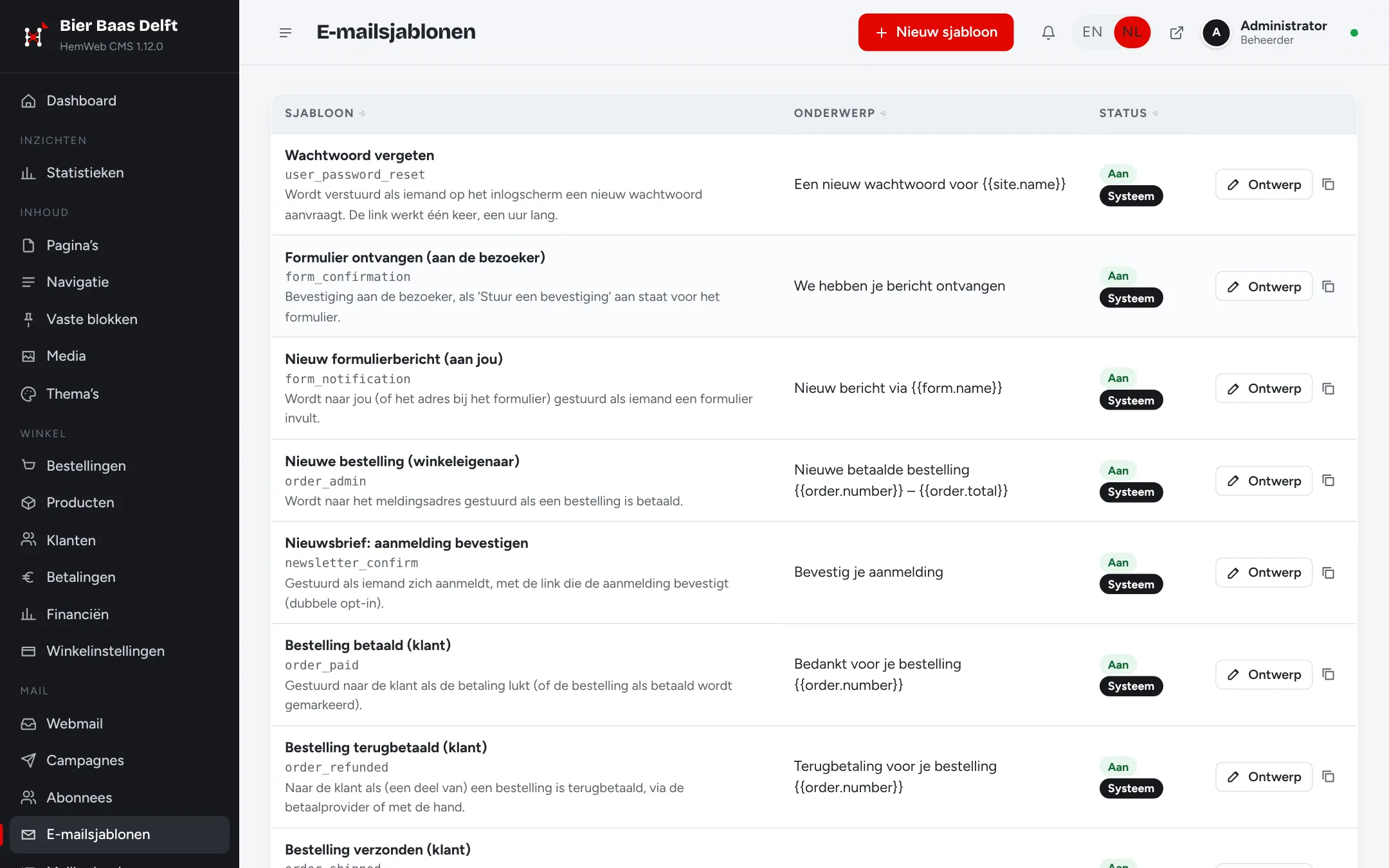
Email, webmail and newsletters
Design your emails in the CMS: click and type, with your own details filled in. Read your mail and send newsletters in the same place.
- Confirmations for orders and forms
- Webmail for your own mailboxes
- Newsletters with lists and scheduling
-
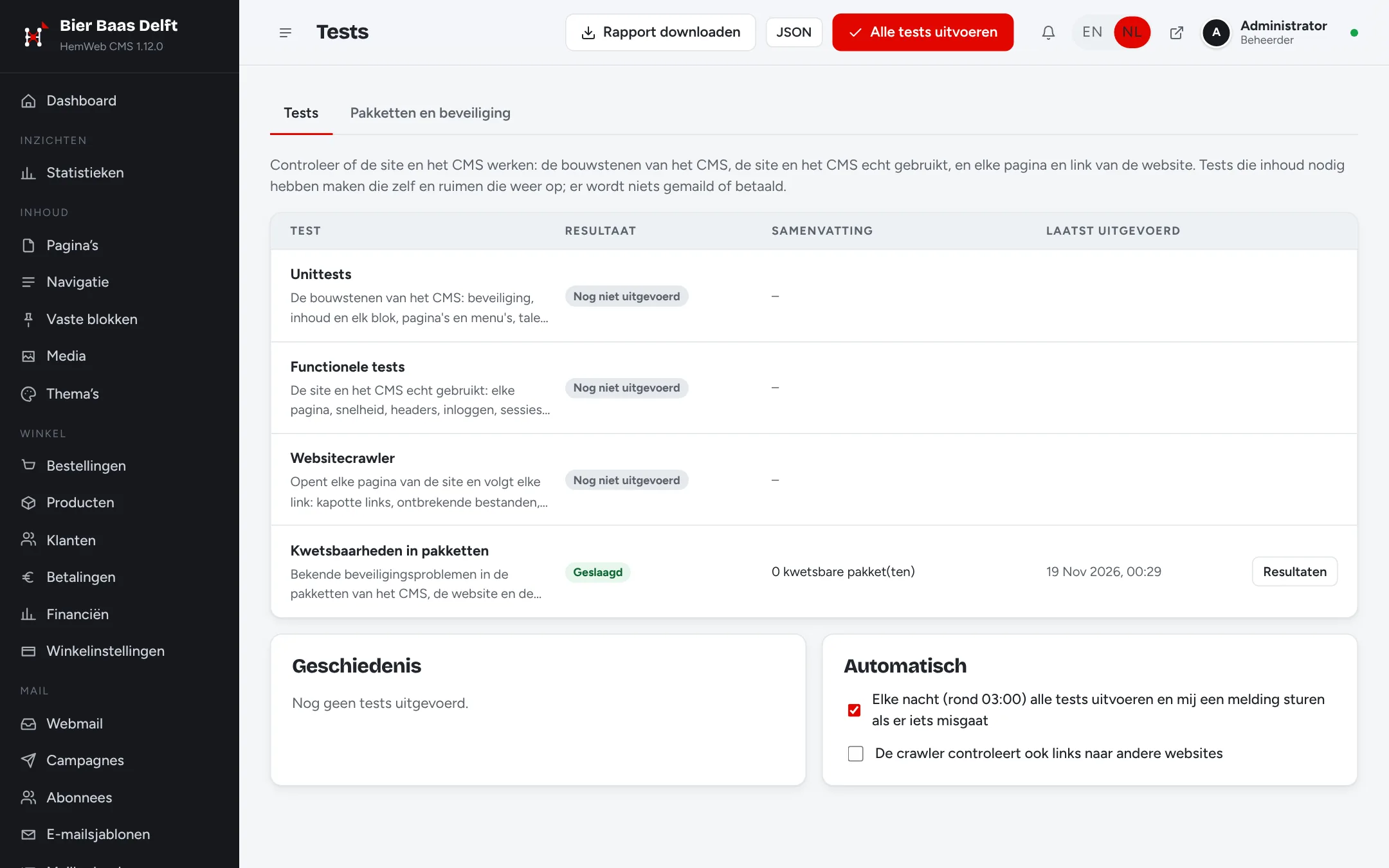
Security and maintenance
A daily check for known vulnerabilities, and a report on your site.
- Update packages and Node.js from the CMS
- Security log and failed sign-ins
- Built-in tests and a link checker
Try it yourself
Start your own demo of the HemWeb CMS: a private sandbox with the real setup wizard. Pick a theme, build pages in the visual editor and let the AI help with a few messages. Nobody else sees your demo.
All features
Everything that comes with HemWeb CMS, on your own server. No plugins needed.
Editing
- Click a text on your own page and type; click an image to replace it.
- Add, move and copy blocks, with a preview on desktop, tablet and phone.
- Draft and publish, with version history to go back.
- Edit together at the same time: you see each other type, and a field someone is editing is locked for others.
- Automatic saving as a draft.
Pages and structure
- Pages and subpages, ordered by dragging.
- Menus with submenus, and fixed blocks for the header, footer, announcement bar and closing band.
- A media library for images, video, music and subtitles. Drag photos and videos from your computer straight onto the page.
- Photos become WebP automatically: small images enlarged sharply, large ones scaled down, turned upright and without location data. The original is kept.
- Multilingual sites: translate a page into a copy with one click and fill in the text.
- A title and description per page for search engines, with language links (hreflang).
Blocks
- Hero, text, image, cards, call to action, FAQ, packages and prices.
- Contact details, map (Google Maps or OpenStreetMap, loaded only after a click), products and forms.
- Video from your media library or YouTube, with an automatic thumbnail and subtitles, and music with a playlist.
- A sign-up block for your newsletter.
- Cards, packages and products as a grid, carousel or list, with their own layout on phones.
- Links are picked from a list of your pages or typed yourself.
Design
- 50 themes, each with its own style, and all text readable to WCAG AA.
- Theme editor: every colour, fonts, effects, edges, buttons, header and your own CSS, with a live preview.
- Your own logo in the header, the footer and as the browser icon.
AI
- Choose during the installation: the AI sets up your site, or you do it yourself.
- An AI assistant in the CMS for changes and new features, such as delivery by postal code or bookings.
- The AI builds what the CMS doesn’t do yet as its own module, up to complete web applications.
- Attach photos and documents (PDF, Word, Excel): the AI reads and uses them.
- Have the AI design a logo and choose from a few ideas.
Web shop
- Products with categories, stock, featured products and a was-price.
- Checkout in five steps: cart, details, delivery, payment and review.
- Payment through Mollie (iDEAL, credit card and more), Stripe, PayPal, Skrill, Tikkie, Rabo Smart Pay, ING Checkout, Revolut Business, bunq or bank transfer.
- Every payment method on or off on its own, with its own order and a minimum and maximum amount. You pay the transaction costs yourself or, where that's allowed, pass them on to your customer.
- Shipping with Sendcloud, MyParcel, PostNL or DHL: a shipping label in one click, a pick-up point chosen at checkout, and track & trace in the email to your customer.
- Customer accounts: register or sign in with Google, Microsoft or Apple, save addresses and see earlier orders.
- Local delivery: delivery areas on a map, opening hours, the address filled in from the postcode, an age check (18+) and bottle deposits.
- Orders and statuses in the CMS, and refunds from the order: in full or in part, through the payment provider and with an email to your customer.
- A financial overview: revenue, refunds and transaction costs per payment method, per day or per month, exportable to Excel (CSV).
Forms
- A form builder with text, email, phone, date, dropdown, multiple choice and a consent tick box.
- A ready-made contact form.
- Messages are stored, emailed to you with the visitor as reply-to, and exportable to CSV.
- Spam stopped without a captcha.
Email and newsletters
- Your own mail server on your server, or your own SMTP.
- Webmail in the CMS: read and send from your own mailboxes, share them with colleagues, and lay out messages with your own templates.
- A visual designer for email templates, with variables, sample data and a test send.
- Newsletters: lists, sign-up with email confirmation, campaigns designed, tested and scheduled, and one-click unsubscribe.
- A mail log of everything that was sent.
Statistics
- Built-in statistics without cookies, with live visitors.
- Google Analytics 4 if you like, behind a cookie banner (Consent Mode v2).
Users and notifications
- Roles and permissions per part of the CMS; the last administrator is protected.
- Sign in with a password, Google, Microsoft, Apple or Firebase, and password reset.
- Notifications in the CMS: new orders and messages, published pages, AI builds, new users, security and tests. On or off per kind.
- The admin in English or Dutch, per user.
Security
- Passwords are hashed in the browser and again on the server with scrypt.
- Secure sessions, CSRF protection, a strict Content Security Policy and a security log.
- A daily check of every Node.js package for known vulnerabilities, with a notification when something turns up.
- A security report, to download or by email every week.
- Your site’s JavaScript reaches visitors minified and obfuscated.
Maintenance and tests
- A develop site, a test site at test.yourdomain.com and your live site: you build and check on test, and publish to live in one click. Until then your domain shows a ‘coming soon’ page.
- The CMS and your own site are kept apart, each in its own repository, and they are updated apart too: CMS updates and website updates, each with its own checks and rollback.
- Every new version of the CMS and your site is tested before it goes live; after an update all tests run again.
- A complete test report (tests, security and vulnerable packages) as HTML or PDF.
- Updates through a deploy key of its own per site: read access to your own repository only, and no passwords on your server.
- Fix vulnerable packages, update npm and Node.js and restart, all from the CMS.
- Update the CMS to the newest version with one click: first a trial start on a copy of the database, and automatically back to the previous version if something goes wrong.
- Built-in tests with one click or every night: the parts of the CMS, the site as visitors use it, and a crawler that finds broken links and missing files.
Extending
- Modules with their own blocks, CMS screens, routes and database tables.
- A web application of your own inside a module, started and watched by the CMS on its own path of your site.
Your own server
- With management and maintenance we keep an eye on your site: availability, certificate, versions, tests and security are reported to us, and we fix problems, with AI too.
- Your own server (Ubuntu or Windows) that installs itself: Node.js, Git, mail server, HTTPS and firewall.
- Your domain name and email address are set up for you.
How it works
Choose and pay
Your domain name and your server. The installation is free: you only pay for the first year of hosting and the first year of your domain.
Your server sets itself up
Your own server with Ubuntu or Windows, no shared hosting. It installs Git, Node.js, its own mail server and the CMS, and sets up your domain, email and secure connection. You get a test site at test.yourdomain.com; until launch your domain shows a ‘coming soon’ page.
Set up your site with AI
You get a link to the setup wizard. Tell the AI what kind of site you want; it prepares pages, copy and your branding for you, and designs a logo if you don’t have one yet.
Publish and manage it yourself
Happy with your test site? Publish it to your domain in one click. Unlimited pages you manage yourself. Hosting and domain renew yearly; changes by us through an hour bundle.
From order to live site
How your site goes online: from the server you order to the code on your live site. Every step is tested automatically; what doesn’t pass goes no further.
- Order: You pick a package or HemWeb CMS, with your domain name and your own server in Amsterdam.
- The server sets itself up: Usually within 10 to 20 minutes, without you having to do anything: Git, Node.js, Express, HemWeb CMS, 3 times, Caddy (HTTPS and routing), Let’s Encrypt certificates, Mail server, firewall, DNS
- One repository, three branches: Your code lives privately on GitHub. From one starting point it branches into develop, test and main, and every environment fetches only its own branch.
- develop: develop.yourdomain.com, test: test.yourdomain.com, main: yourdomain.com. Automatic tests (CI): every environment tests a new commit before it goes on, and code only moves to test or live when every test passes.
- Monitoring: Once your site is live, we keep an eye on it. If something goes wrong, we know first. Reachability every 5 minutes, Every test, every night, Check for vulnerable packages, Report to HemWeb on every change
Order HemWeb CMS
from €149.95 per year
The installation is free. You only pay for your own server and your domain name, and your CMS is ready within the hour.
Order the CMSWindows server, incl. VAT. Domain name extra.